It’s tempting to keep using the same power adapter your product started with—especially if it “mostly works” in the lab. But as equipment evolves, the power system often becomes the quiet bottleneck: random reboots under load, warm connectors, unstable sensors, or higher-than-expected failure rates after deployment. In many industrial and commercial devices, moving up to a 360W desktop power supply isn’t about chasing a bigger number—it’s about protecting uptime, improving stability, and reducing long-term service risk.
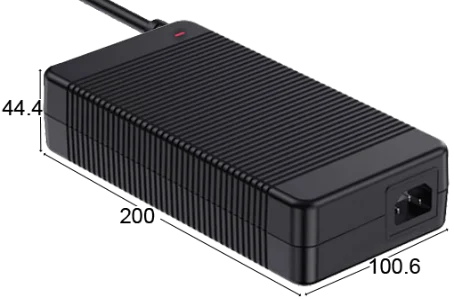
In this article, we’ll compare a 360W desktop power supply with lower wattage adapters in real-world terms, and show when upgrading actually makes sense. If you want to review the reference product while reading, here is the product page link: 360W Power Supply-GJ350WD Series Desktop Series Power Supply.
1) The most common reason to upgrade: your “peak load” grew quietly
Many teams size a power adapter based on average consumption. That works until your device adds features:
-
additional modules (wireless, camera, sensors, displays)
-
higher-performance chips (more current draw under load)
-
motors, solenoids, relays, pumps, or heating elements
-
faster charging circuits for internal batteries
-
more ports or peripherals powered by the same supply
A device that averaged 70–90W a year ago might now hit much higher peaks during startup, actuation, or full-load operation. Lower wattage adapters can still power on, but they might run close to their limit during peaks. That’s where you see resets, brownouts, or unstable behavior that is difficult to reproduce consistently.
Practical indicator
If your device fails only during specific actions (motor start, heating cycle, communication burst, audio peak), you likely have a transient power issue. A higher power supply with better headroom can solve it more cleanly than endless firmware “workarounds.”
2) “It works, but it runs hot” is a warning sign, not a success
Lower wattage adapters operating near maximum output will typically run hotter. Heat is the main enemy of long-term power reliability, and it affects more than the adapter itself:
-
connector pins can warm up and loosen over time
-
cables can stiffen or fatigue faster
-
internal components age quicker, reducing stability and increasing ripple
-
the device may run hotter because conversion inefficiency increases at high load
Upgrading to a 360W supply often means the adapter is working at a more comfortable load percentage in your real usage. That reduction in stress can improve overall reliability, especially for equipment expected to run long hours.
3) When a lower wattage adapter becomes the “system limiter”
Power is not only watts. It’s also regulation and how the supply responds to load changes.
A. Regulation and stability under dynamic load
Industrial and commercial devices can be sensitive to rapid load shifts. Lower wattage supplies might be stable at steady loads but struggle when current changes quickly. Symptoms include:
-
display flicker during actuation
-
intermittent communication dropouts
-
sensor readings drifting
-
CPU resets during high load events
A higher wattage desktop power supply is often designed with more margin and robust control behavior, which helps the system stay stable during step loads.
B. Noise and EMI impact
Switching power supplies can introduce conducted noise. When a supply is stressed, noise can increase and cause system-level problems—especially with sensitive sensors, audio equipment, RF modules, or long cable runs. If your team has spent time debugging “mystery noise,” the power adapter may be a larger part of the story than you think.
4) The biggest mistake: “wattage” without margin planning
Upgrading makes sense when your design needs margin for:
-
ambient temperature swings
-
airflow restrictions (inside cabinets, tight desks, high-density setups)
-
aging of components over time
-
manufacturing variation and cable length differences
-
real user behavior that pushes the system harder than your test script
A 360W supply can be the right move if your typical operating load is already high, or if your device has frequent peaks. Even if you’re not constantly drawing 360W, having headroom can reduce failure rates and support future revisions without redesigning the power platform.
5) Real scenarios where a 360W upgrade is the right call
Here are common situations where moving to a 360W desktop power supply is a practical decision, not overkill:
Scenario 1: Multi-module industrial equipment
If your system runs a controller plus multiple peripherals, the load profile becomes unpredictable—especially when actuators and communication modules are active at the same time. A higher power supply reduces the chance of transient drops.
Scenario 2: Audio and speaker systems
High output peaks can draw large bursts of power. A supply with better headroom can reduce clipping, resets, or protection-trigger events, especially if the system is used at high volume for extended periods.
Scenario 3: Security and surveillance setups
When multiple modules share power—cameras, IR lighting, NVR peripherals—power spikes can occur during switching or night mode changes. A higher wattage supply provides stable operation under those transitions.
Scenario 4: Devices with internal battery charging
If your device both runs and charges an internal battery, the power profile can change dramatically depending on battery state. Lower wattage adapters can struggle when the device load and charging load overlap.
Scenario 5: Upgrading the product without changing the enclosure
Sometimes you’re not allowed to redesign the mechanical enclosure for thermal reasons. Moving the conversion and heat outside, with an external 360W supply, can keep the device design stable while improving total system reliability.
6) When upgrading does NOT make sense
A bigger power supply isn’t always the solution. Upgrading may not help if:
-
the real issue is wiring, connector mismatch, or poor strain relief
-
the device has an internal fault that causes overloads
-
your system needs a different voltage regulation approach (e.g., isolated rails)
-
the supply is oversized without a clear need, leading to unnecessary cost and shipping weight
The goal is not “bigger.” The goal is “stable, certified, and consistent.”
7) A simple decision checklist for buyers and engineers
Use this checklist to decide whether moving to 360W is justified:
-
Does the device reboot or behave unstable during specific actions?
-
Is the current adapter running hot, especially at the connector?
-
Has the device expanded in features since the adapter was chosen?
-
Do users operate the device in warm, enclosed, or dusty environments?
-
Are you seeing higher returns or field complaints related to power?
-
Do you want one power platform that supports multiple product variants?
If you answered “yes” to several points, upgrading to a 360W desktop power supply is often the most direct way to reduce risk.
8) A practical reference: GJ350WD Series Desktop Power Supply
For teams looking at a 360W option, the GJ350WD desktop series is one reference to consider for projects that need stable external power delivery, consistent manufacturing, and a supplier who can support OEM programs. You can review the product details here: 360W Power Supply-GJ350WD Series Desktop Series Power Supply.
When you evaluate any 360W model, come prepared with:
-
your target output voltage/current
-
your load map (steady + peak)
-
connector and cable requirements
-
operating temperature and installation environment
-
target market compliance needs
That information will quickly reveal whether a 360W upgrade is appropriate, and which configuration is safest for long-term production.
Closing thought
In industrial equipment, power issues often show up as “random” problems—until you zoom out and look at the load profile, thermal stress, and margin planning. Upgrading from a lower wattage adapter to a 360W desktop power supply makes sense when you need stability, reliability, and room for real-world peaks. Done correctly, it’s one of the simplest upgrades that can reduce service calls, improve user experience, and protect your device’s reputation.
www.szguijin.com
Shenzhen Guijin Technology Co., Ltd.
About Author